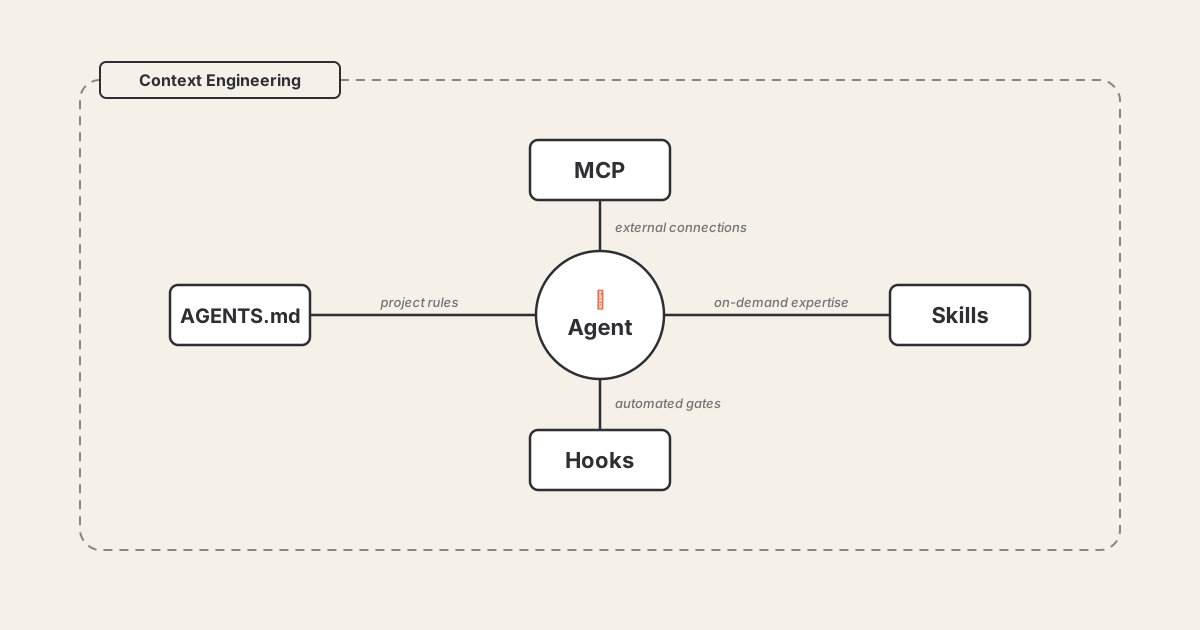
If you’ve also been using AI coding tools like Claude Code, Cursor, or Codex, you’ve probably noticed a flood of new terms around the agentic stack — MCP, Skills, Hooks, AGENTS.md, context engineering. It’s a lot. And if you’re like me, you want to understand what each thing actually does before adopting it.
After working with them for a while and creating a few of them custom myself, I’ve got some understanding, and here’s the deal: these aren’t just buzzwords. They’re distinct primitives that solve different problems, and together they form an emerging “agentic stack”.
In this post I’ll try to break down each one, shows how they relate, and gives you a practical starting point for each.
The Agentic Stack at a Glance
Before we go deep, here’s the mental model. Think of these as layers — each one independent, adopt them incrementally:
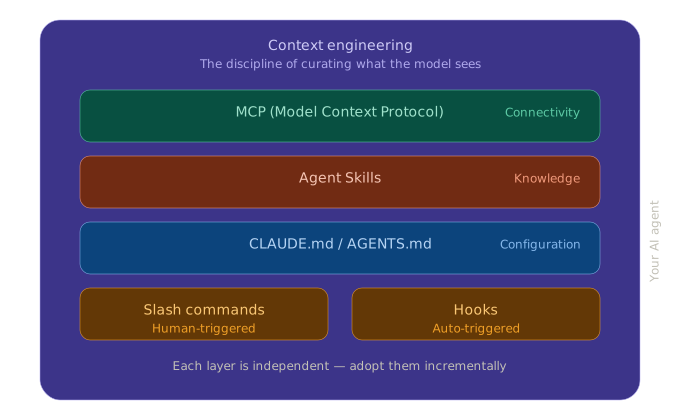
Let’s unpack each layer.
1. MCP (Model Context Protocol) — The USB-C for LLM
What is it?
MCP is an open protocol introduced by Anthropic in November 2024 that standardises how LLMs connect to external tools and data sources. Analogy: Think of it as USB-C for AI — build one connector, and it works with Claude, ChatGPT, Cursor, Gemini, VS Code, you name it.
The problem it solves
Before MCP, if we wanted AI assistant to talk to GitHub, a Postgres database, and Slack, we needed three separate custom integrations per AI tool. That’s an N×M problem. MCP turns it into N+M.
How it works
MCP is built on JSON-RPC 2.0 (inspired by the Language Server Protocol that powers IDE’s syntax highlighting). It defines three primitives:
- Tools: Model-invoked functions (think: “run this SQL query”)
- Resources: Application-controlled data (think: “here’s the project’s README”)
- Prompts: User-invoked templates (think: “use this review template”)
The architecture follows a client-server model:
┌──────────────┐     JSON-RPC      ┌──────────────┐
│  MCP Client  │ ◄──────────────► │  MCP Server   │
│ (Claude Code,│                   │ (GitHub, DB,  │
│  Cursor, etc)│                   │  Slack, etc)  │
└──────────────┘                   └──────────────┘
Where it stands today
MCP has been adopted by OpenAI, Google, and Microsoft. The numbers speak for themselves — 97 million monthly SDK downloads, 10,000+ active servers, and in December 2025, Anthropic donated MCP to the Linux Foundation’s Agentic AI Foundation.
Should you care?
If you’re building integrations between AI tools and external systems — yes, absolutely. If you’re just using AI coding tools day-to-day, you benefit from MCP indirectly (it’s what powers your tool’s (like claude code, cursor, etc.) ability to connect to Google Drive, Jira, databases, etc.).
2. Agent Skills — On-Demand Expertise
What is it?
Agent Skills are folders containing a SKILL.md file (plus optional scripts, templates, reference docs) that teach an AI agent how to perform a specific task. Introduced by Anthropic in 2025, now adopted across Claude Code, Codex, Cursor, Gemini CLI, and more.
The problem it solves
Stuffing everything into one giant system prompt is wasteful. Most of the time, the agent doesn’t need to know how to generate PowerPoint files or run your deploy pipeline. Skills let agents load knowledge on demand — only when relevant.
How it works: Progressive Loading
This is the clever part. Skills load in three levels:
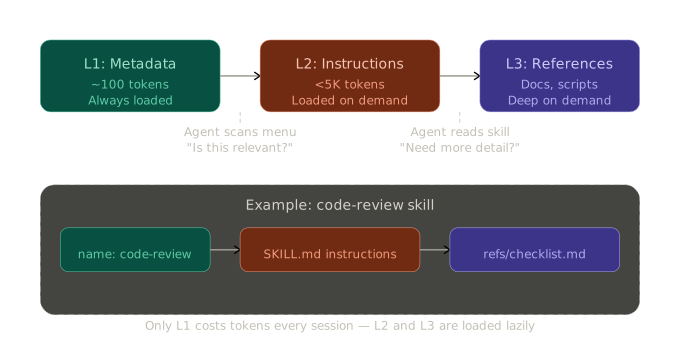
- L1 (Metadata, ~100 tokens): Just the name and description. Loaded at startup for all skills. The agent scans this like a menu.
- L2 (Instructions, <5K tokens): The full skill body — loaded only when the agent decides it needs this skill.
- L3 (References): Supporting docs, scripts, assets. Loaded within the skill on demand.
In practice
A typical skill directory looks like this:
.claude/skills/
  deploy/
    SKILL.md          # Instructions for deploying via Helm
    references/
      helm-values.md  # Production helm values reference
    scripts/
      smoke-test.sh   # Post-deploy smoke test
And SKILL.md is just markdown:
---
name: deploy
description: Deploy to Kubernetes using Helm charts
---

# Deploy Skill

## When to use
Use when asked to deploy, release, or push to staging/production.

## Instructions
1. Check current context with `kubectl config current-context`
2. Run `helm upgrade --install ...` with values from references/
3. Run scripts/smoke-test.sh after deploy
4. Report success/failure with pod status
Where it stands today
Skills are supported by most major AI coding tools. Community directories like agentskills.io and Vercel’s skills.sh make discovery easy. Google’s ADK has native SkillToolset support. There’s even research (Memento-Skills) on agents that write their own skills.
Should you care?
If you use AI coding tools daily, yes. Skills are how you encode repeatable workflows. Instead of re-explaining “how we do deploys” every session, write a skill once. Learn more at agentskills.io.
3. Slash Commands — Quick Prompt Shortcuts
What is it?
Custom commands you trigger with a / prefix. You create a .md file in a commands folder, write your prompt in natural language, and invoke it.
How it works
.claude/commands/
  review.md       # /review — code review prompt
  commit.md       # /commit — commit message generator
Inside review.md:
Review the changes in the current branch. Focus on:
- Security issues
- Performance regressions
- Missing tests
Use $ARGUMENTS as additional context if provided.
Then in Claude Code: /review focus on the auth module
The catch
Slash commands are being superseded by Skills in most tools. Claude recently merged both. Skills are more powerful — they support scripts, reference docs, and LLM-driven discovery (the agent finds the right skill automatically instead of you typing /command).
If you’re starting fresh, invest in Skills. Commands still work as a simpler entry point, but new investment should go into the skill format.
4. Rules Files (CLAUDE.md / AGENTS.md)
What is it?
A markdown file at your project root that gives the AI agent persistent context about your project — build commands, coding conventions, architecture decisions, things it can’t figure out by just reading the code.
Different tools, different names
| Tool | File |
|---|---|
| Claude Code | CLAUDE.md |
| OpenAI Codex | AGENTS.md |
| Cursor | .cursorrules |
There’s a push to standardize on AGENTS.md, but the concept is the same.
What to put in it
# Project: my-django-app

## Build & Test
- `make test` — run pytest suite
- `make lint` — run ruff + mypy

## Conventions
- Use type hints everywhere
- Models go in `apps/<name>/models.py`
- Never modify migrations directly — always use `makemigrations`

## Architecture
- Django 5.0 + DRF
- Postgres 16, Redis for caching
- K8s deployment via Helm (charts in `deploy/`)
What NOT to put in it
Everything. This is important — a recent ETH Zurich study (AGENTbench, March 2026) found that:
- Auto-generated rules files actually reduced task success by ~3% and increased costs by 20%+
- Human-written files with only non-inferable details showed a ~4% improvement
- More rules ≠ better performance. Bloated files cause “lost in the middle” effects where agents ignore instructions
Keep it short, under ~50 lines. Only include what the agent can’t discover from your code.
Should you care?
Always. This is the lowest-effort, highest-impact thing you can do. Write one today for your project if it don’t have already.
5. Hooks — Automated Quality Gates
What is it?
Scripts that run automatically at specific points in the agent’s lifecycle — before a file edit, after a command execution, before a commit. Think of them like Git hooks, but for your AI agent.
The problem it solves
You don’t want to manually tell the agent “now run prettier, now run mypy, now run tests” after every change. Hooks automate this.
In practice (Claude Code)
// .claude/settings.json
{
  "hooks": {
    "afterFileEdit": [
      "black $FILE",
      "mypy $FILE --ignore-missing-imports"
    ],
    "beforeCommit": [
      "pytest tests/ -x -q"
    ]
  }
}
Now every time the agent edits a file, it automatically formats with black and type-checks with mypy. Before any commit, tests run. No babysitting required.
Where it stands today
Claude Code has robust hook support. Cursor recently started supporting them. Most other tools haven’t caught up yet.
Should you care?
If you’re running AI agents with any autonomy (not just autocomplete), hooks are essential for maintaining code quality. Set up formatting and type-checking hooks at minimum.
6. Context Engineering — The Meta-Discipline emerging
What is it?
Context engineering is the umbrella practice of designing, structuring, and optimizing the information environment an AI agent operates in. It encompasses all the primitives above we discussed.
The five operations
Context engineering can be broken down into five core operations:
- Select: Give the agent only what’s relevant, not everything
- Compress: Summarize large outputs; store full data on disk, keep summaries in context
- Order: Put critical rules early in the prompt (agents suffer “lost in the middle”)
- Isolate: Use sub-agents with their own context windows for heavy tasks
- Format: Structure context for machine parsing, not human readability
Real-world example
Meta recently shared how they used 50+ AI agents to pre-compute 59 context files encoding tribal knowledge for their data pipelines. Result: 40% fewer tool calls per task, and complex work that took ~2 days of research now completes in ~30 minutes.
Should you care?
The ceiling for AI-assisted development/workflow isn’t prompt quality — it’s context quality. This is the skill worth investing in.
MCP vs Skills: Not Competing, Complementary
I kept conflating these when I first started — here’s the distinction that clicked for me:
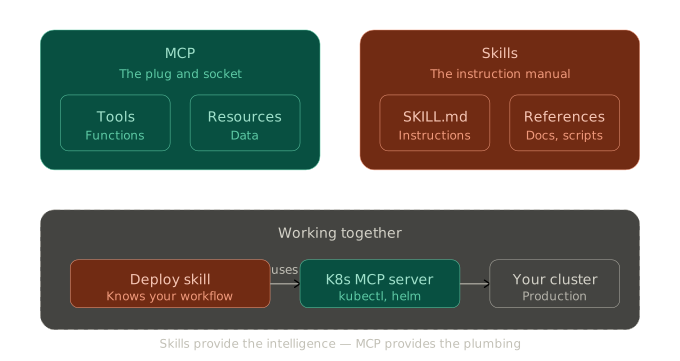
A skill might instruct the agent to use a particular MCP server, specify how to interpret its outputs, and define fallback strategies if the connection fails. Skills provide the procedural intelligence; MCP provides the connectivity.
Putting It All Together: A Practical Example
Say you’re working on a Django project (my usual setup). Here’s what each layer does for you:
- CLAUDE.md tells the agent: “Use pytest, follow PEP 8, never touch migrations directly”
- Skills provide on-demand expertise: a
deployskill knows your Helm workflow; acode-reviewskill has your team’s checklist - Hooks automatically run
blackandmypyafter every edit - MCP servers connect the agent to your Jira board and Postgres database
- Context engineering is what you’re doing when you keep CLAUDE.md under 50 lines, split heavy tasks into sub-agents, and
/clearbetween unrelated tasks
What Should You Do Right Now?
To get started, I’d suggest following priority order:
- Write a CLAUDE.md / AGENTS.md for your main projects. Under 50 lines. Only non-inferable info.
- Set up hooks for formatting and type-checking. Two lines of config, massive payoff.
- Try a community skill from agentskills.io, then write one for your (or your team’s) specific workflow.
- Explore MCP if you need your agent to talk to external services. Check what already exists.
- Learn context engineering as a practice. Birgitta Böckeler’s piece on martinfowler.com is an excellent starting point.
Looking Ahead
The ecosystem is still in a “storming” phase. Slash commands are being absorbed by Skills. Rules files might merge into Skills too, let’s see. MCP is maturing toward enterprise readiness. And context engineering is becoming a recognized discipline with its own research papers and career paths (“harness engineering”). I’m still figuring out where all of this is going — but knowing why each layer exists is what turns fumbling into fluency, not just how to use them. And these why will give a real edge as AI-assisted development becomes the default.